Introduction
Malware, short for malicious software, is one of the biggest threats in today’s digital world. From individuals using personal computers to multinational organizations managing sensitive data, everyone is vulnerable to malware attacks. Cybercriminals continuously develop new types of malware to steal information, disrupt operations, demand ransom, or gain unauthorized access to systems.
According to cybersecurity reports, malware attacks have become increasingly sophisticated, targeting not only computers but also smartphones, cloud environments, and Internet of Things (IoT) devices. Understanding the different types of malware is the first step toward protecting your systems and responding effectively to cyber incidents.
What is malware?
Malware is any software intentionally designed to infiltrate, damage, disrupt, or gain unauthorized access to computer systems, networks, or devices. Unlike legitimate software created to assist users, malware is developed with malicious intent.
Malware can spread through:
- Phishing emails
- Malicious websites
- Infected USB drives
- Software downloads from untrusted sources
- Exploitation of software vulnerabilities
- Fake software updates
Once inside a system, malware may steal sensitive information, encrypt files, monitor user activity, or provide attackers with remote control over the infected device.
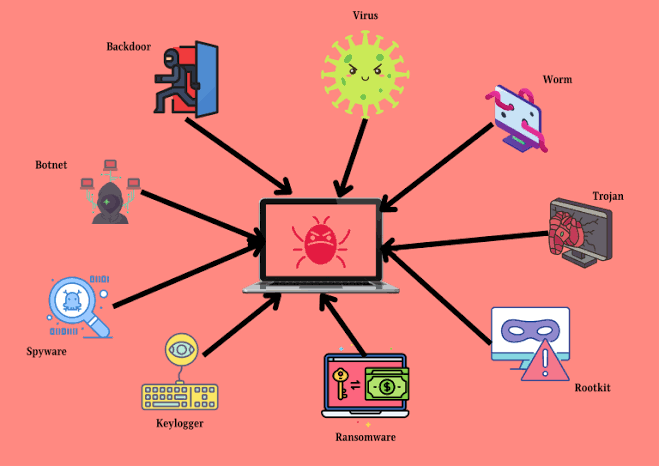
Common Types of Malware
I. Virus—
A computer virus is one of the oldest and most recognized forms of malware. It attaches itself to legitimate files or programs and spreads when those files are executed.
Characteristics:
- Requires user action to activate
- Replicates by infecting other files
- Can corrupt or delete data
- May slow down system performance
Example:
The Melissa virus (1999) spread rapidly through email attachments, infecting thousands of computers worldwide.
II. Worm-
Unlike viruses, worms can spread automatically without requiring user interaction. They exploit vulnerabilities in operating systems or network services to replicate themselves across connected devices.
Characteristics:
- Self-replicating
- Spreads over networks
- Consumes system resources
- Can rapidly infect entire organizations
Example:
The WannaCry ransomware outbreak initially spread using a worm-like mechanism that exploited the EternalBlue vulnerability.
III. Trojan Horse—
A Trojan disguises itself as legitimate software while secretly performing malicious activities.
Unlike viruses and worms, Trojans do not replicate themselves.
Characteristics:
- Appears as software
- Installs hidden malware
- Opens backdoors for attackers
- Steals passwords and confidential data
Example:
A fake PDF reader downloaded from an unofficial website may secretly install spyware or ransomware.
IV. Ransomware-
Ransomware encrypts files or locks an entire computer system and demands payment in exchange for restoring access.
It has become one of the most financially damaging forms of cybercrime.
Characteristics:
- Encrypts important files
- Displays ransom demands
- Targets individuals, hospitals, businesses, and governments
- Payment does not guarantee file recovery
Famous Examples
- WannaCry
- LockBit
- Ryuk
- REvil
V. Spyware-
Spyware secretly monitors user activity without consent.
Its primary objective is gathering sensitive information.
Information commonly stolen:
- Login credentials
- Banking information
- Browsing history
- Credit card details
- Personal documents
Spyware often remains hidden for long periods, making detection difficult.
VI. Adware-
Adware primarily displays unwanted advertisements.
While some adware is relatively harmless, malicious variants collect browsing habits and redirect users to unsafe websites.
Symptoms:
- Frequent pop-up advertisements
- Browser redirects
- Changed homepage
- Slow browser performance
Many free software packages include bundled adware.
VII. Rootkit-
A rootkit is designed to hide malware from users and security software.
It provides attackers with privileged access while remaining invisible.
Characteristics:
- Hides malicious processes
- Disables antivirus software
- Maintains long-term access
- Extremely difficult to detect
Rootkits often require a complete operating system reinstallation to eliminate them.
VIII. Keylogger-
A keylogger records every keystroke typed on a keyboard.
Cybercriminals use keyloggers to capture:
- Usernames
- Passwords
- Banking credentials
- Email logins
- Confidential communications
Keyloggers may be software-based or hardware devices connected between the keyboard and computer.
IX. Bot and Botnet Malware—
A bot is malware that allows attackers to remotely control an infected device.
When thousands of infected devices are connected together, they form a botnet.
Botnets are commonly used for:
- Distributed Denial-of-Service (DDoS) attacks
- Email spam campaigns
- Cryptocurrency mining
- Credential theft
Victims are often unaware that their computers are participating in cyberattacks.
X. Fileless Malware-
Fileless malware operates primarily in system memory rather than installing traditional executable files.
Because it leaves few traces on disk, it is particularly challenging for conventional antivirus software to detect.
Characteristics:
- Uses legitimate system tools
- Runs in memory
- Avoids signature-based detection
- Common in targeted attacks
Fileless malware often abuses PowerShell, Windows Management Instrumentation (WMI), or scripting engines.
XI. Cryptojacking Malware—
Cryptojacking malware secretly uses an infected computer’s processing power to mine cryptocurrencies.
Effects:
- High CPU usage
- Slow system performance
- Increased electricity consumption
- Hardware overheating
Victims usually notice performance degradation before realizing the system has been compromised.
XII. Scareware-
Scareware frightens users into believing their computer is infected.
It displays fake security warnings encouraging users to purchase fraudulent antivirus software or install additional malware.
Common scareware messages include:
- “Your computer has 527 viruses!”
- “Immediate action required!”
- “System security compromised!”
These alerts are designed to create panic and encourage impulsive actions
How Malware Infects Systems
Malware infections commonly occur through:
- Phishing emails with malicious attachments
- Fake software downloads
- Cracked or pirated software
- Infected USB drives
- Drive-by downloads from compromised websites
- Weak or outdated software
- Malicious advertisements (malvertising)
Many successful attacks exploit human error rather than technical vulnerabilities.
How Digital Forensics Investigates Malware
Digital forensic investigators play a crucial role after a malware incident.
Their objectives include:
- Identifying the malware family
- Determining the infection vector
- Examining system logs
- Analyzing malware behavior
- Preserving digital evidence
- Supporting legal investigations
Specialized forensic tools help investigators reconstruct attack timelines and understand the full scope of a compromise.
Best Practices for Malware Prevention
Preventing malware requires a combination of technology and user awareness.
Recommended practices include:
- Install reputable antivirus and endpoint protection software.
- Keep operating systems and applications updated with the latest security patches.
- Avoid opening suspicious email attachments or clicking unknown links.
- Download software only from trusted and official sources.
- Use strong, unique passwords and enable multi-factor authentication (MFA).
- Regularly back up important files to offline or secure cloud storage.
- Educate users about phishing and social engineering techniques.
- Scan removable media such as USB drives before use.
- Monitor systems for unusual network activity or performance issues.
Conclusion
Malware continues to evolve, becoming more sophisticated and difficult to detect. From traditional viruses and worms to advanced fileless malware and ransomware, each type poses unique risks to individuals and organizations. Understanding how different malware families operate enables users to recognize warning signs, strengthen cybersecurity practices, and respond more effectively to incidents.
For cybersecurity professionals and digital forensic investigators, malware analysis is essential for identifying attack methods, preserving evidence, and mitigating future threats. By combining proactive security measures with user awareness and timely incident response, organizations can significantly reduce the impact of malware attacks.




Post comments (0)