Every file stored on a computer occupies space on a storage device such as a hard disk or SSD. But have you ever wondered how the operating system keeps track of where each file is stored?
This is where file allocation methods come into play. These methods define how files are stored and managed on secondary storage devices, ensuring efficient data access and optimal space utilization.
In this blog, we will explore the three major file allocation methods used in operating systems:
- Contiguous Allocation
- Linked Allocation
- Indexed Allocation
Let’s dive in.
What Are File Allocation Methods?
File allocation methods are techniques used by the operating system to allocate disk blocks to files.
When a file is created, the operating system must decide:
- Where to place the file on disk
- How to keep track of its blocks
- How to retrieve the file efficiently
The chosen allocation method directly impacts:
- Access speed
- Storage efficiency
- Fragmentation
- System performance
1. Contiguous Allocation
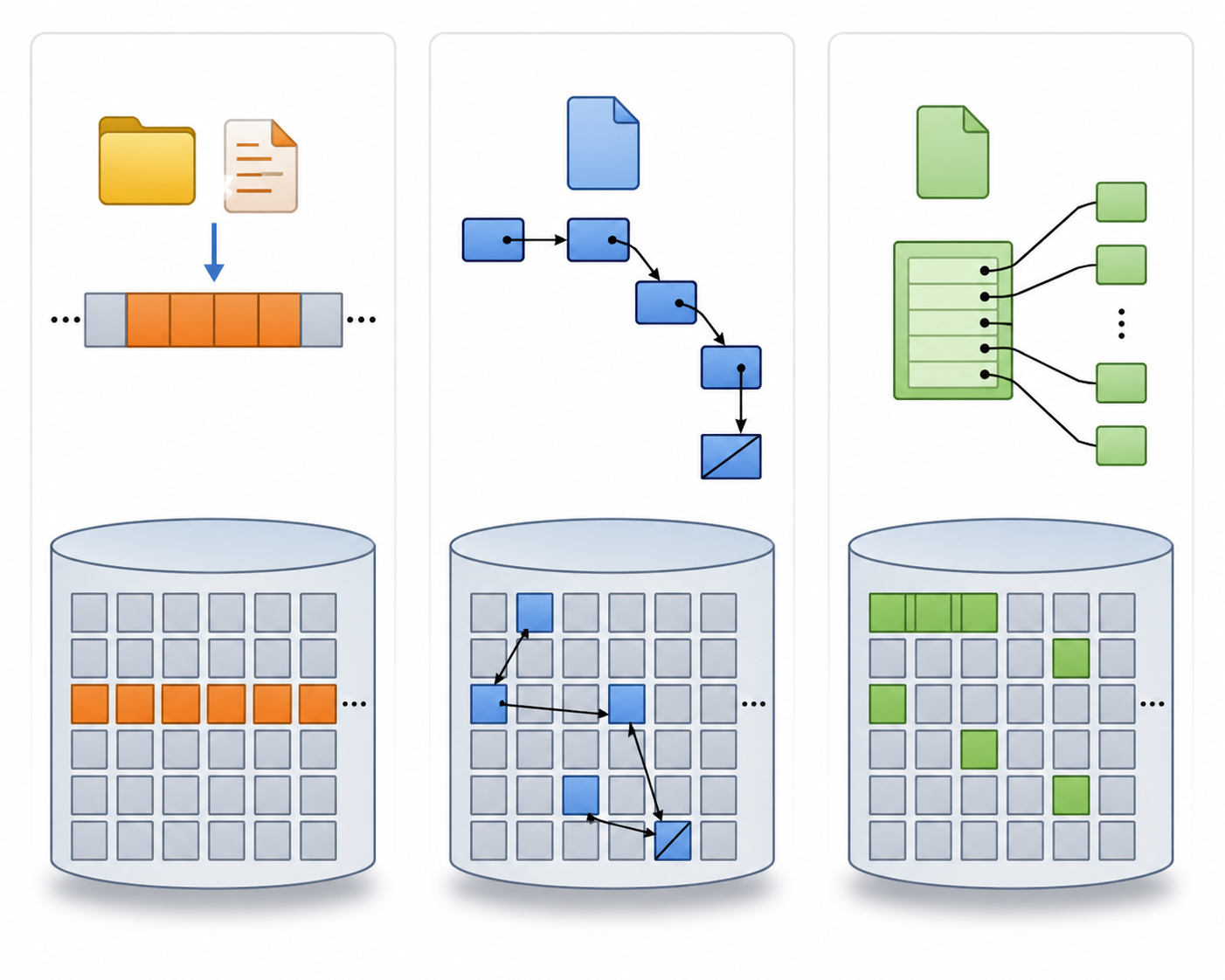
In contiguous allocation, all blocks of a file are stored in consecutive disk locations.
Example:
If a file requires 5 blocks and starts at block 20, it occupies:
20 → 21 → 22 → 23 → 24
Advantages
- Very fast sequential and direct access
- Simple implementation
- Minimal disk seek time
Disadvantages
- Causes external fragmentation
- Difficult to expand files dynamically
- Requires prior knowledge of file size
Best Used When
Contiguous allocation works best in systems where file sizes are fixed or predictable.
2. Linked Allocation
In linked allocation, each file is stored as a linked list of disk blocks scattered across the disk.
Each block contains:
- File data
- A pointer to the next block
Example:
9 → 16 → 1 → 10 → 25
Advantages
- No external fragmentation
- Files can grow dynamically
- Efficient space utilization
Disadvantages
- Slow random access
- Pointer storage overhead
- Risk of data loss if a pointer is corrupted
Best Used When
Suitable for systems requiring frequent file growth and sequential access.
3. Indexed Allocation
In indexed allocation, a special index block stores pointers to all file blocks.
Example:
Index Block → [7, 19, 4, 28, 35]
The file data resides in those referenced blocks.
Advantages
- Supports direct access
- No external fragmentation
- Easy file expansion
Disadvantages
- Extra storage needed for index block
- Wastage for very small files
- Complex implementation
Best Used When
Ideal for modern operating systems requiring efficient random access.
Comparison of File Allocation Methods
| Feature |
Contiguous Allocation |
Linked Allocation |
Indexed Allocation |
| Access Speed |
Fast |
Slow Random Access |
Fast |
| Fragmentation |
External |
None |
None |
| Dynamic Growth |
Difficult |
Easy |
Easy |
| Implementation |
Simple |
Moderate |
Complex |
| Storage Overhead |
Low |
Medium |
High |
Why File Allocation Matters
Efficient file allocation is crucial because it affects:
System Performance
Faster file access improves overall responsiveness.
Disk Utilization
Better allocation reduces wasted space.
Scalability
Allows systems to manage growing storage needs.
Reliability
Improper allocation can lead to corruption and data retrieval issues.
Real-World Applications
Different file systems use different allocation strategies:
- FAT (File Allocation Table) → Linked allocation concept
- NTFS → Indexed allocation structures
- Ext4 → Advanced indexed methods with extents
Modern operating systems often combine multiple techniques for maximum efficiency.
Final Thoughts
File allocation methods are fundamental to how operating systems manage data storage. Whether using contiguous, linked, or indexed allocation, each method balances speed, flexibility, and storage efficiency differently.
Understanding these methods gives deeper insight into how computers organize and retrieve information behind the scenes.
As storage technologies continue evolving, smarter allocation techniques will keep driving faster and more reliable computing systems.
Understanding file allocation methods is not just an academic concept—it’s the foundation of efficient digital storage management.




Post comments (0)