Modern smartphones store far more than what is physically present on the device. Photos, messages, documents, contacts, location history, application data, and backups are increasingly synchronized with cloud services. As a result, cloud data in mobile investigations has become a critical source of digital evidence, helping investigators reconstruct events, recover deleted information, and establish timelines.
While examining a mobile device remains an essential part of any digital forensic investigation, limiting the examination to the handset alone can result in incomplete findings. Understanding how cloud platforms store and synchronize data is now an indispensable skill for digital forensic professionals.
National Institute of Standards and Technology (NIST): https://www.nist.gov/
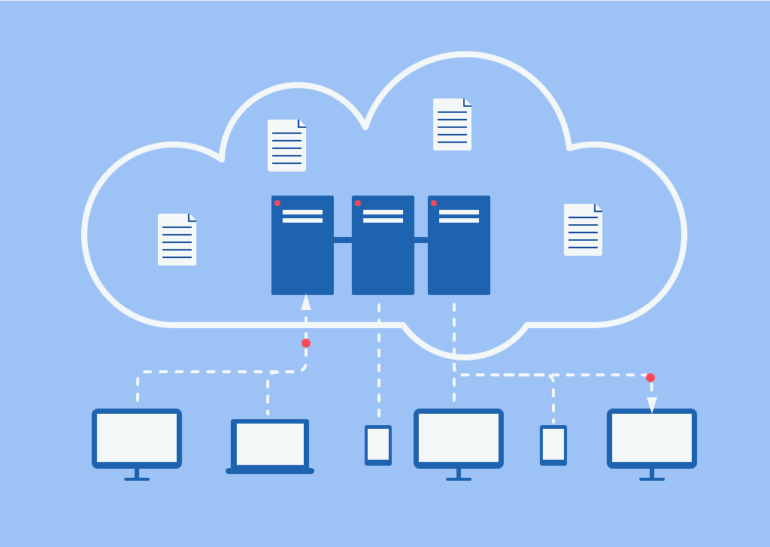
What Is Cloud Data?
Cloud data refers to information stored on remote servers rather than solely on the mobile device itself. Most smartphones automatically synchronize data with cloud platforms, allowing users to access their information from multiple devices.
Some of the most common cloud services include:
- Apple iCloud
- Google Drive and Google One
- Google Photos
- Microsoft OneDrive
- Dropbox
- Samsung Cloud
- WhatsApp Cloud Backup
- Telegram Cloud Storage
These services often contain valuable evidence that may no longer exist on the physical device.
Why Cloud Data Matters in Mobile Investigations
Cloud evidence can significantly strengthen an investigation by providing access to information that cannot be recovered directly from the device.
Examples include:
- Deleted photographs and videos
- Cloud backups of messaging applications
- Contact lists and calendars
- Device backup files
- Documents and spreadsheets
- Location history
- Browser synchronization data
- Notes and reminders
- Application settings and logs
In many investigations, suspects delete files from their phones believing the evidence has disappeared. However, synchronized copies may still exist within cloud accounts.
CISA (Cybersecurity and Infrastructure Security Agency) – https://www.cisa.gov/
Common Sources of Cloud Evidence
1. Device Backups
Android and iPhone devices frequently perform automatic cloud backups when connected to Wi-Fi and charging. These backups may contain:
- SMS messages
- Call logs
- Application data
- Device settings
- Photos
- Contacts
Historical backups can also provide snapshots of the device at different points in time.
2. Cloud-Based Messaging
Applications such as WhatsApp use cloud backups to preserve chat histories.
Depending on the platform:
- Android commonly uses Google Drive.
- iPhones typically use iCloud.
These backups may assist investigators in recovering conversations that are unavailable on the device.
3. Photo Synchronization
Services like Google Photos and iCloud Photos automatically upload media files.
Investigators may recover:
- Deleted images
- Original file timestamps
- Geolocation metadata
- High-resolution copies
- Shared albums
4. Location History
Many users unknowingly enable location synchronization.
Cloud platforms may store:
- Frequently visited places
- Travel history
- Route information
- Timeline records
This information can assist in reconstructing a suspect’s movements.
Apple iCloud Security Overview – https://support.apple.com/guide/security/welcome/web
Challenges in Cloud Investigations
Despite its evidentiary value, cloud data presents several investigative challenges.
Legal Authorization
Cloud data is generally protected by privacy laws. Investigators must obtain appropriate legal authority, such as search warrants, production orders, or user consent, depending on the applicable jurisdiction.
Encryption
Many cloud providers encrypt stored information. While encryption enhances user security, it can complicate forensic acquisition if investigators do not possess valid credentials or legal access.
Cross-Border Data Storage
Cloud servers are frequently located in different countries, making jurisdiction and mutual legal assistance procedures important considerations.
Data Volatility
Cloud content can change rapidly. Users may delete files, disable synchronization, or overwrite backups, making timely evidence preservation essential.
Best Practices for Digital Forensic Examiners
When investigating mobile devices that utilize cloud services, forensic practitioners should:
- Identify all cloud accounts linked to the device.
- Preserve account credentials whenever legally authorized.
- Document acquisition methods and timestamps.
- Verify evidence integrity using cryptographic hash values where applicable.
- Maintain a complete chain of custody.
- Use validated forensic tools and standardized procedures.
- Record synchronization status during device examination.
Proper documentation is essential for maintaining the admissibility and credibility of digital evidence.
Google Safety Center – https://safety.google/
The Future of Mobile Forensics
As mobile operating systems increasingly rely on cloud synchronization, investigators must adapt their forensic methodologies. Evidence is no longer confined to a single smartphone—it may be distributed across multiple devices and cloud environments.
Successful mobile investigations require a comprehensive approach that combines physical acquisition, logical extraction, cloud evidence collection, and legally compliant forensic procedures. Organizations that invest in cloud forensic capabilities will be better equipped to investigate cybercrime, financial fraud, insider threats, and criminal cases involving digital evidence.



Post comments (0)