Introduction
USB storage devices, such as flash drives, external hard disks, and portable SSDs, have become indispensable for storing and transferring data. While these devices improve productivity and convenience, they are also frequently used in cybercrime, insider threats, intellectual property theft, and unauthorized data transfers. This is where USB Forensics becomes essential.
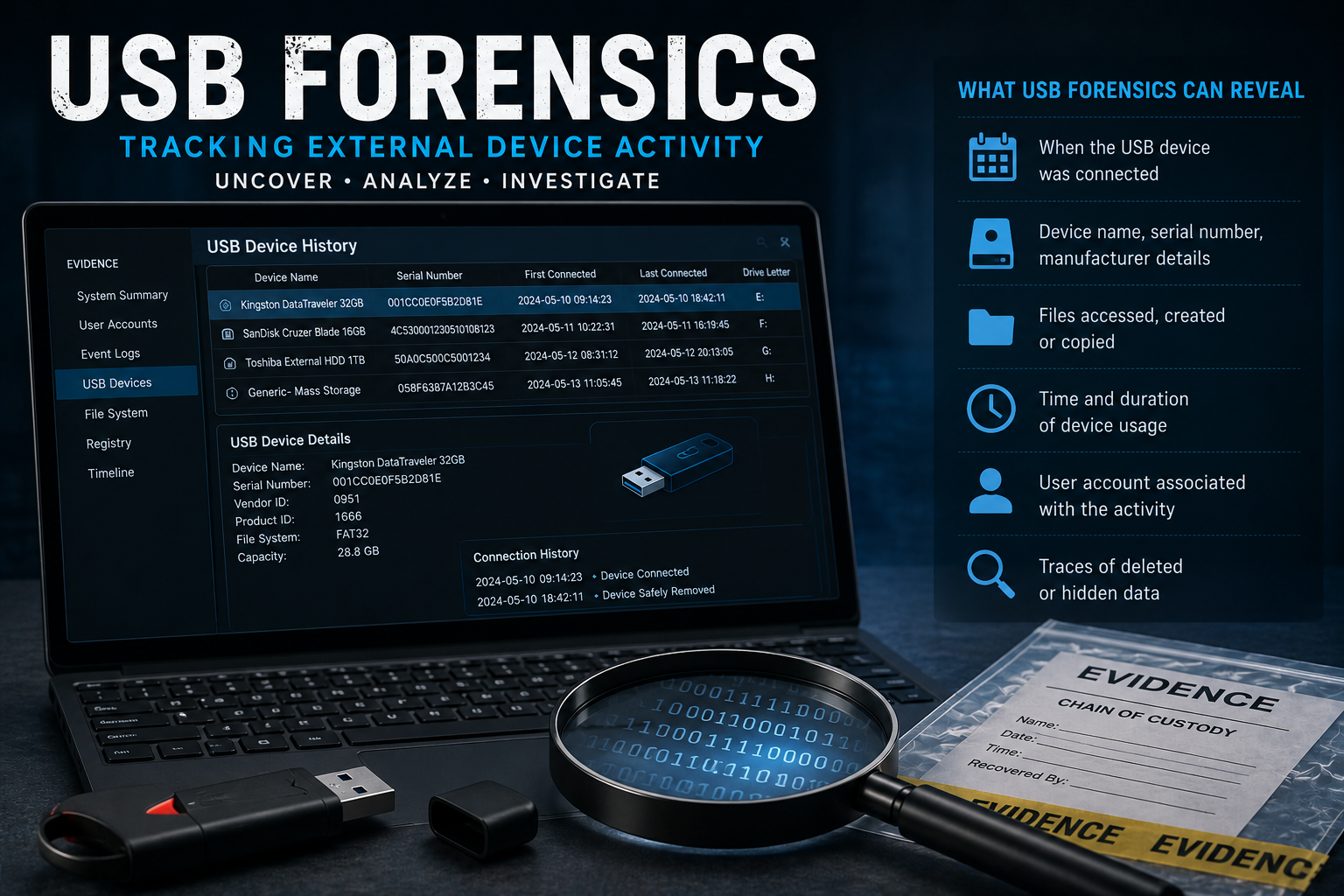
USB Forensics is a specialized branch of digital forensics that focuses on identifying, analyzing, and reconstructing the use of USB devices on a computer. By examining Windows artifacts, system logs, and registry entries, digital forensic investigators can determine when a USB device was connected, what files were accessed, and whether sensitive data may have been copied.
This article explores the importance of USB Forensics, the digital evidence it uncovers, the investigation process, and the tools used by forensic experts.
What Is USB Forensics?
USB Forensics is the process of collecting, preserving, and analyzing digital evidence related to USB storage devices. Investigators examine operating system artifacts and forensic data to determine how a USB device interacted with a computer.
The primary objective is to reconstruct user activity involving external devices while maintaining the integrity of digital evidence.
Why Is USB Forensics Important?
USB devices are commonly involved in cyber incidents because they are portable, inexpensive, and capable of storing large volumes of data.
USB Forensics helps investigators:
- Identify unauthorized USB device usage.
- Detect data theft or exfiltration.
- Investigate insider threats.
- Verify employee activities.
- Recover evidence of deleted files.
- Support legal and corporate investigations.
- Establish timelines of device usage.
Organizations often rely on USB Forensics to determine whether confidential information has been copied to external storage.
Types of USB Devices Investigated
Digital forensic experts examine various types of removable storage devices, including:
- USB Flash Drives
- External Hard Drives
- Portable SSDs
- Memory Cards
- Smartphones connected via USB
- Digital Cameras
- USB Hubs
- External DVD Drives
Each device may leave valuable forensic artifacts on the host computer.
Digital Evidence Recovered Through USB Forensics
One of the primary goals of USB Forensics is to identify evidence left behind after a USB device is connected.
Investigators may recover:
- Device name and manufacturer
- Serial number
- Vendor ID (VID)
- Product ID (PID)
- Date and time of first connection
- Date and time of last connection
- User account associated with the device
- Assigned drive letter
- Device installation history
- File access information
- Registry artifacts
- Windows Event Logs
- Shortcut (LNK) files
- ShellBags artifacts
This information helps reconstruct user activity during an investigation.
How USB Forensics Investigations Are Conducted
1. Evidence Preservation
The first step involves creating a forensic image of the storage device or computer without altering the original evidence.
Investigators calculate cryptographic hash values to verify evidence integrity throughout the investigation.
2. Registry Analysis
The Windows Registry stores detailed information about USB devices that have been connected to a system.
Important Registry locations include:
- USBSTOR
- MountedDevices
- Enum\USB
- DeviceClasses
These artifacts help identify previously connected USB devices.
3. Windows Event Log Analysis
Windows Event Logs record device installation events and hardware activity.
Investigators analyze these logs to determine:
- Connection timestamps
- Device installation history
- Driver installation events
- System responses
4. Shortcut (LNK) File Analysis
Windows automatically creates shortcut files when users open documents stored on USB devices.
These files may reveal:
- File names
- Original file locations
- Access timestamps
- Device information
5. ShellBags Analysis
ShellBags record folder browsing activity within Windows Explorer.
Even if files have been deleted, ShellBags may indicate that folders on a USB device were accessed.
6. Timeline Reconstruction
Investigators correlate evidence from multiple sources to create a chronological timeline.
This timeline may include:
- USB connection events
- File access activity
- User logins
- Application execution
- Network activity
Timeline analysis helps investigators understand exactly what occurred during an incident.
Common Cases Where USB Forensics Is Used
USB device analysis plays a vital role in many investigations., including:
Insider Threat Investigations
Employees may copy confidential company data to removable media before leaving an organization.
Intellectual Property Theft
Sensitive designs, research documents, or source code may be transferred using USB storage devices.
Financial Fraud
Financial records and customer information may be copied without authorization.
Criminal Investigations
USB devices often contain documents, photographs, videos, and communications relevant to criminal cases.
Incident Response
USB devices may introduce malware or ransomware into corporate environments.
Challenges in USB Forensics
Although USB Forensics is highly effective, investigators often face several challenges.
Deleted Artifacts
Some USB activity may be partially removed using anti-forensic techniques.
Encrypted Storage Devices
Encrypted USB drives require additional analysis before investigators can access their contents.
Shared Devices
The same USB device may be used across multiple systems, complicating attribution.
Anti-Forensic Techniques
Cybercriminals may modify timestamps or use secure deletion software to conceal evidence.
Despite these challenges, forensic analysis often uncovers residual artifacts that support investigations.
Tools Used in USB Forensics
Digital forensic experts use specialized software to analyze USB-related artifacts.
Common tools include:
- Magnet AXIOM
- FTK Imager
- EnCase Forensic
- X-Ways Forensics
- Autopsy
- USBDeview
- Registry Explorer
- Eric Zimmerman’s EZ Tools
- Belkasoft Evidence Center
These tools help investigators identify USB activity while maintaining forensic integrity.
Best Practices for USB Forensics
To ensure accurate and legally defensible results, investigators should:
- Create a forensic image before analysis.
- Preserve original evidence.
- Verify evidence using hash values.
- Maintain a documented chain of custody.
- Analyze multiple forensic artifacts.
- Correlate registry data with event logs.
- Document every investigative step.
- Use validated forensic tools.
Following these best practices strengthens the reliability of forensic findings.
Future of USB Forensics
As removable storage technology evolves, USB Forensics continues to advance.
Emerging trends include:
- AI-assisted forensic analysis
- Automated artifact correlation
- USB-C device investigations
- Cloud-connected storage analysis
- Faster timeline reconstruction
- Improved anti-forensic detection techniques
These developments enable investigators to analyze digital evidence more efficiently while improving accuracy.
Conclusion
USB Forensics is an essential component of modern digital investigations. By analyzing Windows artifacts, registry entries, event logs, and other forensic evidence, investigators can determine when USB devices were connected, what actions were performed, and whether sensitive data was transferred.
Whether investigating insider threats, corporate data theft, or cybercrime, USB Forensics provides critical evidence that helps reconstruct events and supports legal proceedings. As removable storage devices continue to play a role in everyday computing, the importance of USB Forensics will only continue to grow.



Post comments (0)