In digital forensics, data stored on a device is not limited to files, databases, photographs, messages, or application records. Volatile memory, commonly known as RAM, can also contain valuable forensic evidence that may disappear when a device is powered off or restarted. Android RAM forensics focuses on acquiring and analysing this volatile data to understand what was happening on an Android device at a particular point in time.
One tool used for Android memory acquisition is LiME (Linux Memory Extractor). LiME is a Linux kernel module designed to acquire volatile memory from Linux-based systems. Since Android uses the Linux kernel, LiME can be adapted for memory acquisition on compatible Android devices.
What Is Android RAM Forensics?
Android RAM forensics is the process of collecting and examining the contents of a device’s volatile memory. Unlike persistent storage, RAM is temporary. Information held in RAM may include running processes, active connections, application data, temporary credentials, cryptographic material, and other information that may not be available in the device’s file system.
This makes memory acquisition particularly useful when investigators need to understand the state of a device while it was running.
For example, a conventional file-system examination may show that an application was installed on a device. A memory examination may provide additional information about whether that application was running, its associated processes, or data temporarily present in memory.
What Is LiME?
LiME (Linux Memory Extractor) is an open-source tool developed for acquiring volatile memory from Linux-based systems. It operates as a loadable kernel module and was designed to minimise the interaction between the acquisition process and the memory being collected.
For Android forensic examinations, LiME can be particularly useful because Android is built on the Linux kernel. However, successful acquisition depends heavily on the device’s kernel, architecture, security configuration, and level of access.
Investigators can refer to the LiME project repository for its source code and technical documentation.
How Does LiME-Based Acquisition Work?
A typical LiME-based Android memory acquisition workflow involves several stages.
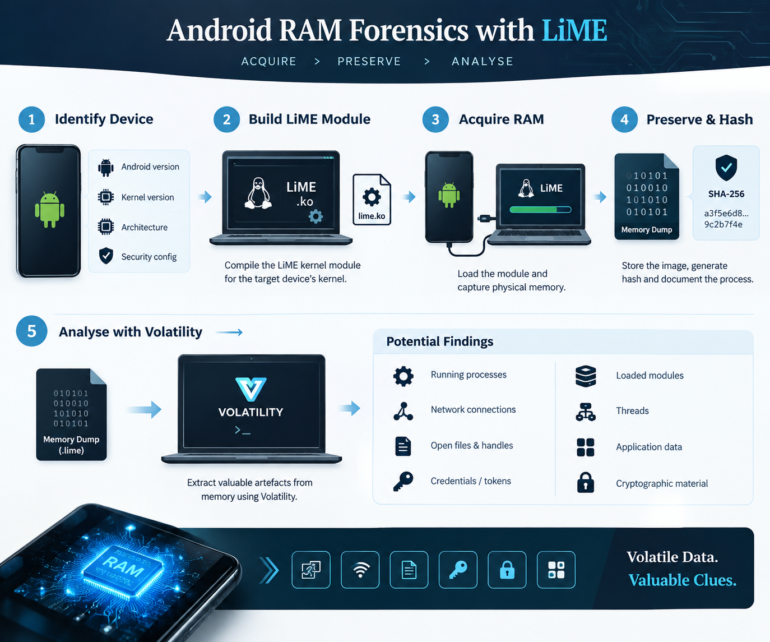
1. Device Identification
Before acquisition, the examiner should document relevant information such as the Android version, device model, processor architecture, kernel version, security configuration, and device state.
This information is important because the LiME kernel module generally needs to be compatible with the target device’s kernel.
2. Preparing the LiME Module
LiME is compiled as a kernel module. For a physical Android device, the examiner may need access to an appropriate kernel source tree, configuration, and build environment.
Kernel compatibility is one of the most important technical considerations. A module built for one kernel may not work correctly on another device, even if both devices use the same Android version.
3. Acquiring Volatile Memory
Once the appropriate module is available and the required privileges have been obtained, LiME can be used to acquire the device’s physical memory.
Depending on the examination setup, the memory image may be written to local storage or transmitted to another system. Investigators should select an acquisition method that minimises unnecessary changes to the target device.
The examiner should document the acquisition procedure, tool version, module information, timestamps, and any actions performed on the device.
4. Preserving and Hashing the Image
After acquisition, the resulting memory image should be treated as forensic evidence. A cryptographic hash should be generated and recorded so that the integrity of the acquired image can be verified during subsequent analysis.
Maintaining detailed acquisition notes is equally important. A technically successful memory dump without proper documentation can create difficulties when the evidence needs to be explained or presented later.
Analysing an Android Memory Image
Acquiring RAM is only the first stage. The resulting memory image must be interpreted using appropriate memory-forensics techniques.
Tools such as Volatility can assist investigators in analysing memory images and identifying processes, threads, network information, loaded modules, and other structures where suitable profiles, symbols, and operating-system support are available.
The Volatility Foundation provides information about the Volatility memory-forensics framework.
Potential areas of examination can include:
- Running and recently active processes
- Process and thread information
- Network connections
- Loaded modules
- Open files and handles
- Application-related information
- Temporary data residing in memory
- Potential authentication or session artefacts
- Cryptographic material that may have been present in RAM
The availability of these artefacts varies significantly between Android versions, kernels, applications, and device configurations.
Challenges in Android RAM Forensics
Android memory acquisition is considerably more complex than simply connecting a device and extracting a file. Modern smartphones implement multiple security mechanisms, including secure boot, verified boot, SELinux, hardware-backed security, encrypted storage, locked bootloaders, and vendor-specific kernel configurations.
Root or kernel-level access may be required for memory acquisition, and obtaining such access can itself alter the device. Furthermore, loading a kernel module changes the state of the system, meaning that the examiner must carefully document the acquisition process and understand its forensic implications.
Another challenge is that Android devices use highly customised kernels. Consequently, memory-analysis techniques that work on one device may not work on another.




Post comments (0)