In the modern corporate world, your company’s lifeblood lives in the cloud. From intellectual property discussed over Microsoft Teams to critical financial spreadsheets stored in OneDrive, corporate data is vast, collaborative, and heavily targeted.
But what happens when something goes wrong? Whether it’s a sudden corporate espionage scare, a devastating Business Email Compromise (BEC) attack, or an internal data leak, organizations must pivot quickly. This is where Microsoft 365 forensics steps in—a sophisticated practice of uncovering, preserving, and analyzing digital footprints to recover legally defensible business evidence.
Why Microsoft 365 Forensics Matters
When a security incident strikes, standard IT troubleshooting is not enough. Deleting an email or wiping a device doesn’t erase the entire digital trail, but if you don’t know where to look, crucial artifacts can easily vanish due to default log retention limits.
Digital forensics ensures that your investigation maintains a strict chain of custody. This makes any recovered data admissible in a court of law or during internal corporate compliance reviews. By deploying specialized techniques within the Microsoft cloud ecosystem, organizations can uncover not just what happened, but who did it and how far the damage spread.
Key Pillars of Evidence Recovery in M365
Conducting an investigation within Microsoft 365 (formerly Office 365) requires knowing which levers to pull. The ecosystem provides several native, highly advanced tools designed for deep forensic analysis.
1. The Unified Audit Log (UAL): Your Investigation’s Backbone
The Unified Audit Log is the ultimate source of truth for M365 forensic investigators. It records user and administrator activities across Exchange Online, SharePoint, OneDrive, Microsoft Teams, and Microsoft Entra ID (formerly Azure AD).
When tracking an insider threat or an external hacker, the UAL allows investigators to analyze:
-
IP addresses used during unauthorized logins.
-
File access, modification, and deletion events.
-
The creation of malicious mailbox forwarding rules (a common sign of a BEC attack).
2. Microsoft Purview eDiscovery
For legal compliance and deep data harvesting, Microsoft Purview eDiscovery is an indispensable enterprise solution. It allows legal and security teams to discover, preserve, and analyze content in place across the M365 tenant.
Using Purview eDiscovery, investigators can apply Legal Holds to prevent data from being permanently altered or purged by an adversary. Advanced capabilities like conversation threading for Teams and predictive AI coding significantly reduce the time required to cull through terabytes of raw data. To understand the foundational architecture supporting these workflows, it’s helpful to see how data moves securely during an investigation:
3. Forensic Evidence via Insider Risk Management
A relatively hidden gem in Microsoft Purview is the Forensic Evidence feature. When properly configured, this opt-in capability provides visual context by securely capturing on-device user activity during high-priority risk triggers—such as a user attempting unauthorized exfiltration of sensitive files to personal cloud storage. Built with privacy-by-design principles, it masks user identities by default while providing investigators with the concrete evidence needed to take immediate action.
Best Practices for a Defensible Forensic Investigation
If your organization faces a sudden litigation threat or breach, follow these critical steps to preserve your data’s integrity:
-
Turn on Advanced Audit Logging Early: Ensure your M365 licenses support extended audit log retention. By default, many logs are only kept for 180 days unless configured otherwise.
-
Enforce Least Privilege: Limit forensic and compliance roles (such as the eDiscovery Manager or Compliance Administrator roles) to essential personnel to prevent internal tampering.
-
Act Quickly on Retention Policies: Before an employee departs or an account is terminated, apply a preservation hold to ensure automated system cleanup routines don’t delete evidence. 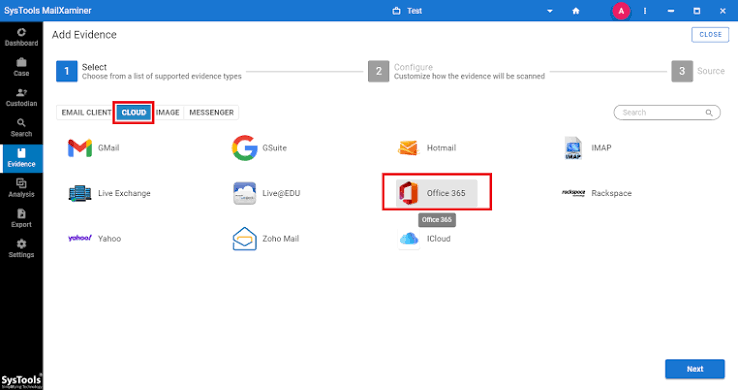
Preparing for the Unexpected
Cloud forensic environments are inherently dynamic. Microsoft regularly updates its cloud architecture, meaning the tools and strategies required to protect your infrastructure must evolve concurrently.
To ensure your organization is fully prepared for an incident, it is highly recommended to establish an Incident Response (IR) playbook specifically tailored to cloud services. Integrating your native M365 forensic tools with a comprehensive corporate security strategy ensures that when a crisis occurs, you aren’t scrambling for answers—you are systematically recovering the truth.
For a deeper dive into establishing legally sound digital investigations, check out our comprehensive guide on Internal Corporate Investigation Frameworks to map out your team’s role protocols.
Have questions about setting up Microsoft Purview or preserving audit logs in your environment? Let’s discuss in the comments below, or learn more about official configurations directly through the Microsoft Purview Documentation.



Post comments (0)